NetForms
System.Windows.Forms · .NET 10 · Windows + Linux

WinForms, Windows only everywhere.

NetForms is Windows Forms for .NET 10 that runs the same on Windows and Linux. Same namespaces, same Application.Run(new MainForm()), same InitializeComponent(). You change the project file, not the code.

Inventory
ItemQtyWarehouse
Copper wire 2.5 mm²1,200 mA-3
Circuit breaker 16 A84B-1
Cable tray 60×5036A-1
What happens today

A WinForms project on Linux fails twice. Then you fix one file.

Build it
$ dotnet build
error NETSDK1100: To build a project
targeting Windows on this operating
system, set the EnableWindowsTargeting
property to true.
Force it
$ dotnet run -p:EnableWindowsTargeting=true
You must install or update .NET
to run this application.
Framework: 'Microsoft.WindowsDesktop.App'
No frameworks were found.
Change the project file
-  <TargetFramework>net8.0-windows</…>
-  <UseWindowsForms>true</…>
+  <TargetFramework>net10.0</…>
+  <PackageReference Include="NetForms"
+     Version="0.1.0-preview.3" />

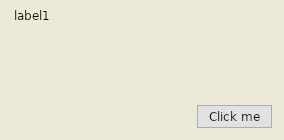
The same app, running on Linux

A project exactly as Visual Studio creates it, after netforms-convert --apply, built from the NuGet packages and started under X11. Not one line of C# changed. netforms-convert also moves .NET Framework 4.x projects and tells you up front what will not carry over, with file and line.

HelloForms window with a label and a Click me button, running on Linux
HelloForms, Ubuntu 24.04, .NET 10
Painted by NetForms, designed in VS Code

Your controls, your designer.

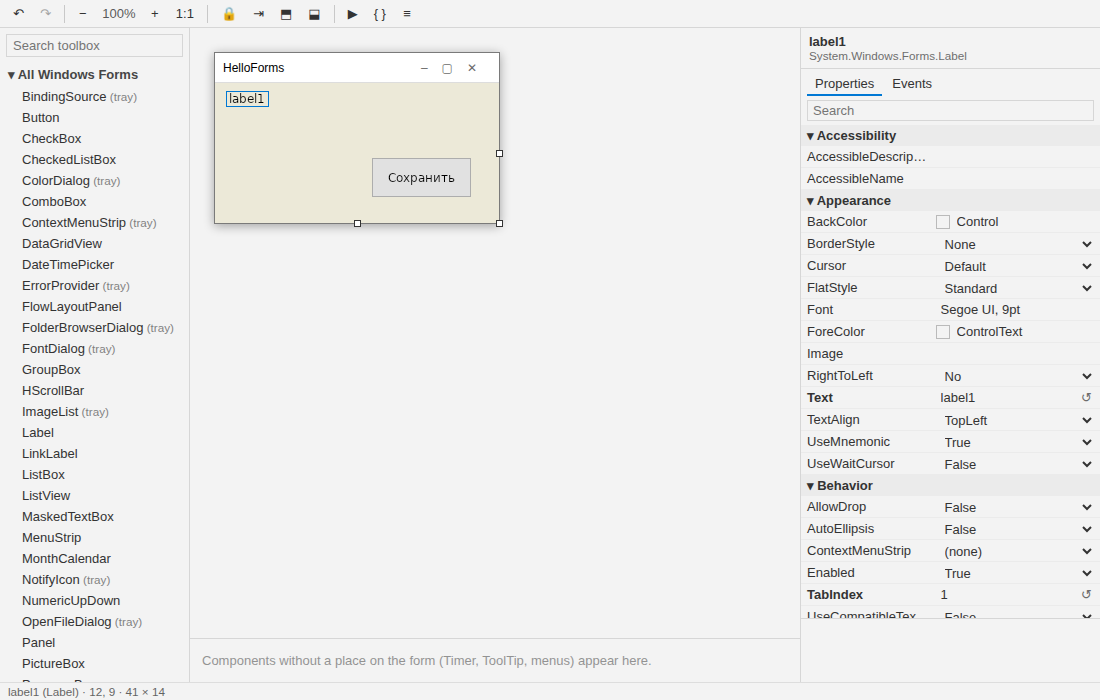
Every control is drawn by NetForms with SkiaSharp, so a form looks the same on both systems. Avalonia 12 does only what Win32 did: windows, input, IME, clipboard, native file dialogs, DPI. The VS Code extension opens any *.Designer.cs as a canvas and writes it back the way Visual Studio does.

The NetForms designer in VS Code: toolbox, form canvas and property grid
NetForms Designer: toolbox, component tray, properties and events, snap lines. Works offline.
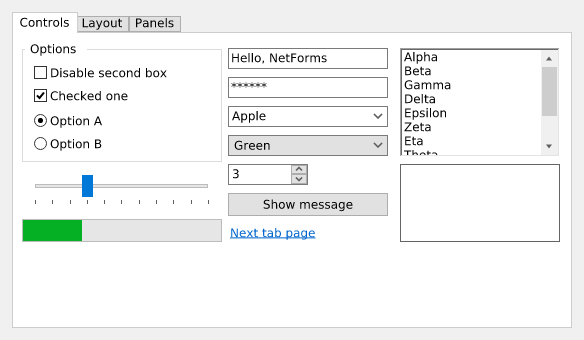
Control gallery: tabs, group box, check boxes, radio buttons, text boxes, combo boxes, numeric up-down, track bar, progress bar, list box
The control gallery. The golden test image is pixel-identical on Windows and Linux.
Preview 0.1 · measured, not guessed

How close to WinForms is it?

Every number comes from a test that runs in CI: the API is compared with the reference assemblies of the real WinForms, behaviour is diffed against it on Windows, real projects are converted and built.

664 / 1254WinForms and System.Drawing types with the complete API; 163 more partial
415 / 415tests pass; layout, event order and text metrics are diffed against the real WinForms
7 / 7.NET Framework 4.8 business apps convert and build with no manual edit
28 / 45open-source WinForms projects convert and build with no manual edit

Works
LayoutAnchor, Dock, TableLayoutPanel, FlowLayoutPanel, AutoSize, AutoScroll
ControlsButton to DataGridView: text, lists, trees, ListView (all views), RichTextBox, pickers, MDI
DataBindingSource, DataSet and DataTable, master-detail, DataGridView editing with its events
MenusMenuStrip, ToolStrip, StatusStrip, ContextMenuStrip, NotifyIcon
DrawingSystem.Drawing on Skia, TextRenderer metrics, custom OnPaint
Resources.resx images and icons, Properties.Settings, app.config
Not yet
Printingmissing PrintDocument, PrintPreviewDialog
Accessibilitymissing screen readers do not see controls
Drag and dropdeclared events compile, no drags yet
Dark theme, DPIpartial one light theme; scaled, but DeviceDpi is 96
Win32by design Handle is zero, WndProc is never called

Full compatibility guide · API coverage, type by type

.NET 10 SDK · Windows 10+ or Linux x64/arm64

Get started

The API documentation is Microsoft's: everything on learn.microsoft.com/dotnet/desktop/winforms applies.

New app

# project and item templates
dotnet new install NetForms.Templates::0.1.0-preview.3
dotnet new netforms -n MyApp
cd MyApp
dotnet run

Existing WinForms app

# report first, then --apply
dotnet tool install -g NetForms.Convert --prerelease
netforms-convert MyApp.csproj
netforms-convert MyApp.csproj --apply
dotnet run

Step by step for Windows, Ubuntu, Debian, Fedora, Astra Linux, RED OS and ALT, VS Code and closed networks: Install and set up.

Visual designer: install NetForms Designer from the VS Code Marketplace or Open VSX (netforms.netforms-designer) and open any *.Designer.cs.