 NetForms
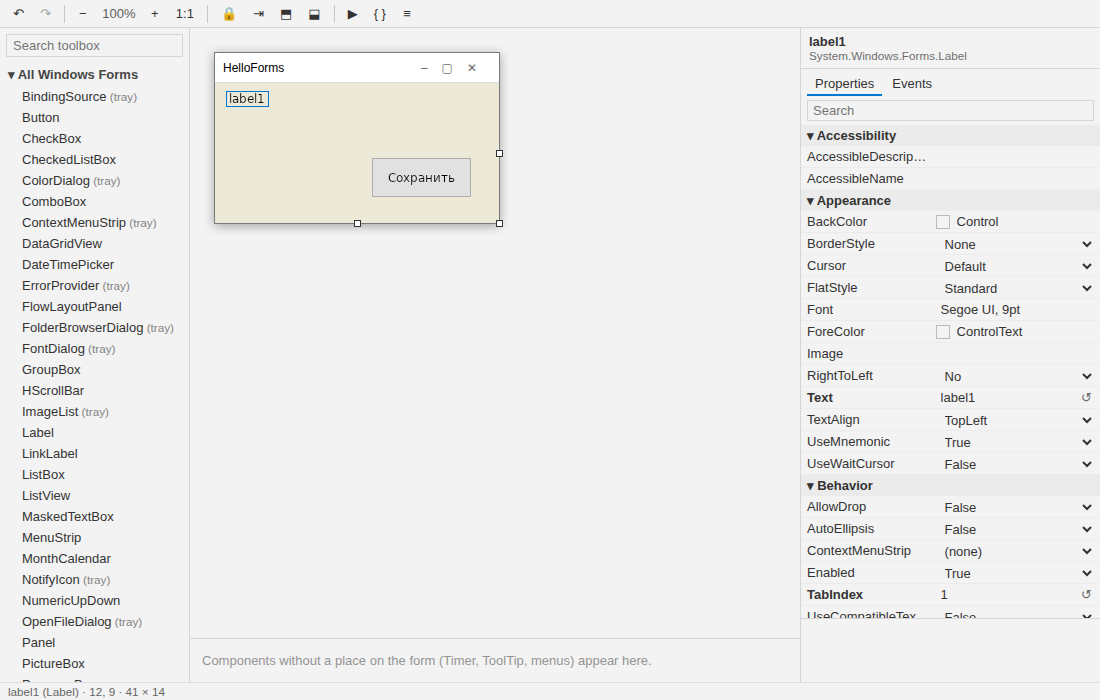
The visual designer
The NetForms designer is a VS Code extension: NetForms Designer (netforms.netforms-designer).
It is the Windows Forms designer of Visual Studio rebuilt for VS Code, on Windows and Linux. Editing forms
works fully offline; creating projects and forms uses the NetForms templates from NuGet.
Installing it and VS Code: Install and set up.
How it works
*.Designer.csopens as a canvas (use Open as Text in the editor title to see the code). F7 goes toMainForm.cs, Shift+F7 back.- The form on the canvas is painted by NetForms itself — a design-time host (
tools/NetFormsDesigner.Host, bundled in the extension) readsInitializeComponent()with Roslyn without compiling your project, builds the live form and sends a picture to the webview. - Every edit is written back to
*.Designer.csin the form Visual Studio writes (same statement order, same comments, sameShouldSerializerules — checked against the real WinForms serializer in CI). A form saved here opens in Visual Studio unchanged and vice versa. The file is the only source of truth: edit it as text or switch branches, and the canvas reloads. - Renaming a control renames its field, its event handlers and their uses in your code.
- Events tab: + next to an event writes a handler with the default name (
button1_Click) intoMainForm.csand opens it — the same as a double-click on the event, or on the control for its default event; typing a name and pressing Enter binds a handler of your own name. → goes to the handler, ✕ unbinds it (the method stays in the code, as in Visual Studio).
Creating projects and forms
NetForms: Create New Project… and NetForms: New Form… (also in the Explorer context menu of a folder)
run dotnet new with the NetForms.Templates package. The first time, the extension installs the template
version it is made for from NuGet (dotnet new install NetForms.Templates::<version>); a new project references
the NetForms package of the same version. A new form gets the namespace of its project plus its folders, as
in Visual Studio, and opens on the canvas.
Commands
| Command | Key | What it does |
|---|---|---|
| NetForms: Open Visual Designer | Opens *.Designer.cs (or the form of the current .cs) on the canvas. |
|
| NetForms: Open as Text | The same file in the text editor. | |
| NetForms: View Code | F7 | From the canvas to MainForm.cs. |
| NetForms: View Designer | Shift+F7 | From MainForm.cs to the canvas. |
| NetForms: Tidy Designer File | Rewrites InitializeComponent() in the canonical form the designer writes, dropping redundant statements. |
|
| NetForms: Create New Project… | A new NetForms application (see above). | |
| NetForms: New Form… | A form or user control in a folder. | |
| NetForms: Convert WinForms Project… | The converter's report for a .csproj, then the rewrite (Moving a WinForms project). |
|
| NetForms: Run Project | dotnet run in a terminal. |
|
| NetForms: Set Designer Host Path… | Use another designer host. | |
| NetForms: Check Setup | Shows the dotnet, the designer host and the templates found. |
Debugging (F5) is the C# extension's: its .NET: Generate Assets for Build and Debug creates the launch.json.
Settings
| Setting | Default | |
|---|---|---|
netforms.dotnetPath |
dotnet |
The dotnet executable, when it is not on PATH. |
netforms.designerHostPath |
empty | Another designer host (NetFormsDesigner.Host.dll); empty: the one bundled with the extension. |
netforms.snapToLines |
on | Snap to edges, centres and margins while dragging (hold Alt to move freely). |
Canvas
Move and resize with the mouse or the arrow keys (Ctrl — by 8, Shift — size), snap lines, select several with Ctrl/Shift, Escape selects the parent, drop into another container, Format → Align / Make Same Size / Spacing, zoom, lock, bring to front / send to back, tab order mode (click the controls in order). Docked controls are outlined with a dashed line and resize only from their free edge, as in Visual Studio. Components without a place on the form (Timer, ToolTip, ImageList, menus, dialogs) go to the tray under the form. Undo and redo with Ctrl+Z / Ctrl+Y inside the canvas.
Not yet
- Writing
.resx: a new image picked in the property grid, editing aLocalizable = trueform (such forms open read-only with an explanation). - Extender properties (
ToolTip on toolTip1,Error on errorProvider1) in the property grid — they are kept in the file, just not shown. - A theme editor.
Language
The interface follows the VS Code display language: English or Russian. Toolbox groups and property categories are named as in the Russian Visual Studio; property descriptions come from WinForms and stay in English.